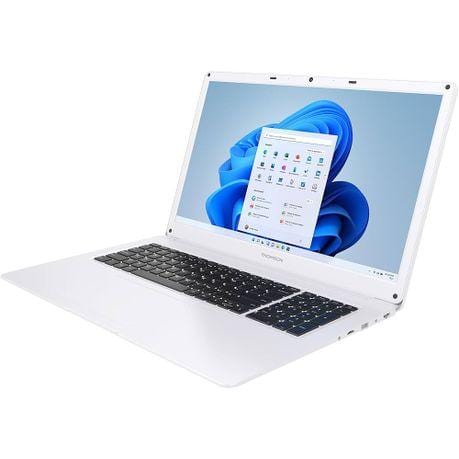
THOMSON Neo N-17 17.3-inch Celeron Notebook
- Intel Celeron N4020 dual-core processor
- 4GB DDR4 memory
- 128GB SSD storage
- 17.3-inch HD+ 1600 x 900 TN display
- Windows 11S** with Microsoft 365 included
- Wi-Fi AC and Bluetooth connectivity
- 0.3MP webcam for basic video calls
- QWERTY US keyboard layout
- White finish
The THOMSON Neo N-17 is a practical large-screen notebook designed for everyday home, study, and office use. Its 17.3-inch display gives you more room for documents, browsing, and streaming, while the Intel Celeron processor, 4GB RAM, and 128GB SSD provide responsive performance for light daily tasks. With Windows 11S, Wi-Fi AC, Bluetooth, and Microsoft 365 included, it is well suited to users who need a simple, ready-to-use laptop in a clean white design.
**Windows 11 in S mode.
Its a locked-down version of Windows 11 Home that only allows apps from the Microsoft Store. Microsoft positions it as more secure and lighter, especially for basic-use laptops. In Windows 11, S mode is only available on the Home edition.
What that means:
- You cant install normal downloaded programs from websites, like Chrome installers, many printer tools, supplier software, cracked nonsense, and a fair few useful business apps.
- Youre pushed toward Microsoft Edge and Store apps.
- It can feel a bit faster and safer because it blocks a lot of the usual Windows chaos. Less freedom, less drama.
The catch:
- You can switch out of S mode for free. (Standard Windows 11 Home)
- Once you do, its permanent. No going back to S mode afterward.